Powered by Blogger.

Social Icons

Featured Posts

Showing posts with label browser. Show all posts

Open a Website with Selenium

Thursday, April 03, 2025

 import time

from selenium import webdriver


driver = webdriver.Chrome()

driver.get("https://www.example.com")


time.sleep(5)

driver.quit()

How to completely remove Firefox Browser

Tuesday, August 22, 2023

Uninstall Mozilla from Add or remove programs

Now search %appdata% and it will open Windows Explorer

Delete folder Mozilla

Close Google Chrome browser from terminal

Monday, February 13, 2023

Run the following command from terminal

taskkill /F /IM chrome.exe

Same command can be used to close other processes.

Just replace chrome.exe with the process name and include extension as well.

Add Bookmarks in Brave Browser for Android

Friday, December 16, 2022

 Open Website in Brave app

Click Bookmark icon in bottom left.


Bookmark will get saved.


Delete Brave browser Internet history on Android

Wednesday, October 12, 2022

Open Brave Browser

Press three dots on lower-right corner


Press History


Press Clear browsing data...


Press Clear data


Open Mozilla Firefox automatically in Private Mode

Wednesday, May 27, 2020

Click Menu -> Options


Click Privacy & Security
Under section History, Click Firefox will drop down list box
Select Never remember history


Prompt will popup asking to restart Mozilla Firefox Browser
Select Restart Firefox now


Now Mozilla Firefox Browser will start in normal mode with the settings of private browsing mode.

Start Mozilla Firefox Browser in Private Mode by default

Wednesday, December 13, 2017

Open Firefox
Type about:config in address bar
Press Enter
Type browser.privatebrowsing.autostart in Search:

Right click browser.privatebrowsing.autostart and click Toggle (value will change to True)
Restart Firefox to apply settings

Alternate method

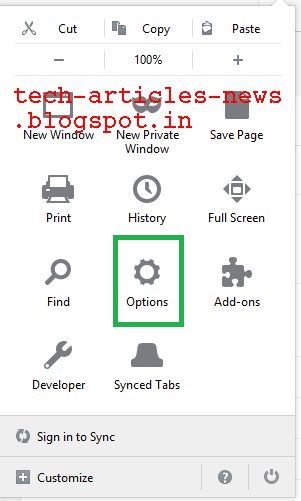
Click Menu


Click Options
 
Click Privacy

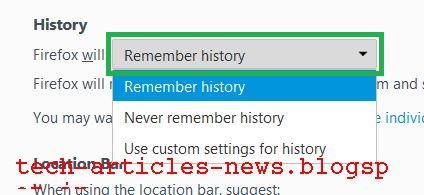
Click Drop Down Box next to Firefox will: 
 

Choose Use custom settings for history
 

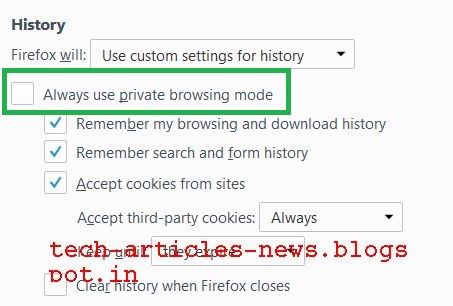
Select checkbox Always use private browsing mode
 
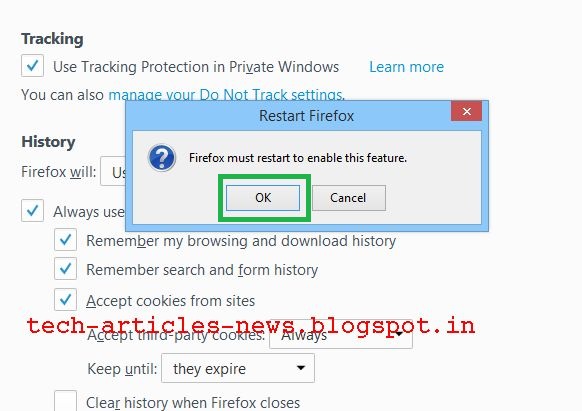
Click OK to restart Firefox
 

Translate

Popular Posts