Powered by Blogger.

Social Icons

Featured Posts

Showing posts with label firefox. Show all posts

How to completely remove Firefox Browser

Tuesday, August 22, 2023

Uninstall Mozilla from Add or remove programs

Now search %appdata% and it will open Windows Explorer

Delete folder Mozilla

Open Mozilla Firefox automatically in Private Mode

Wednesday, May 27, 2020

Click Menu -> Options


Click Privacy & Security
Under section History, Click Firefox will drop down list box
Select Never remember history


Prompt will popup asking to restart Mozilla Firefox Browser
Select Restart Firefox now


Now Mozilla Firefox Browser will start in normal mode with the settings of private browsing mode.

Firefox Corrupted Content Error

Monday, April 01, 2019

Press Shift + Ctrl + R to reload the page

Start Mozilla Firefox Browser in Private Mode by default

Wednesday, December 13, 2017

Open Firefox
Type about:config in address bar
Press Enter
Type browser.privatebrowsing.autostart in Search:

Right click browser.privatebrowsing.autostart and click Toggle (value will change to True)
Restart Firefox to apply settings

Alternate method

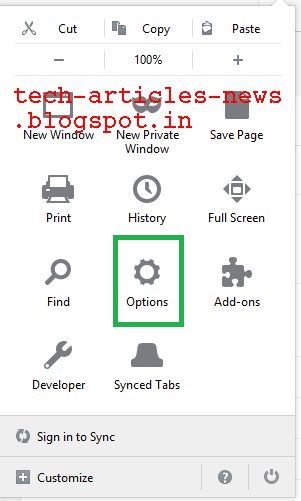
Click Menu


Click Options
 
Click Privacy

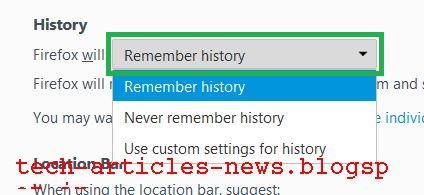
Click Drop Down Box next to Firefox will: 
 

Choose Use custom settings for history
 

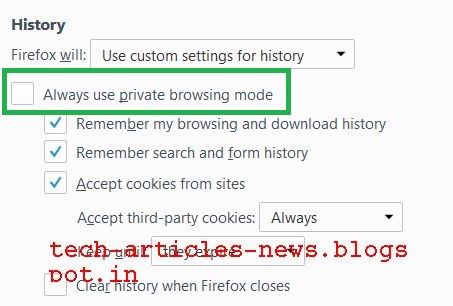
Select checkbox Always use private browsing mode
 
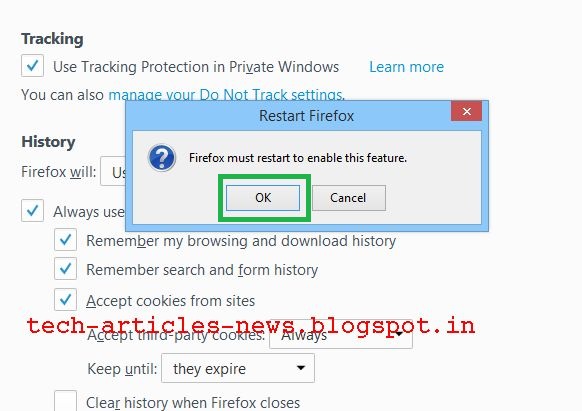
Click OK to restart Firefox

Macro length exceeds 2500 lines, this might take too long to load

Tuesday, July 11, 2017

Go to about:config in Firefox

Enter extensions.imacros.maxMacrolength in search


Double click extensions.imacros.maxMacrolength

Type 5000 or whatever length you want it to be.


Click OK


Now iMacros won't display message if number of lines in code don't exceed specified number.
 

Translate

Popular Posts