Open Mozilla Firefox automatically in Private Mode
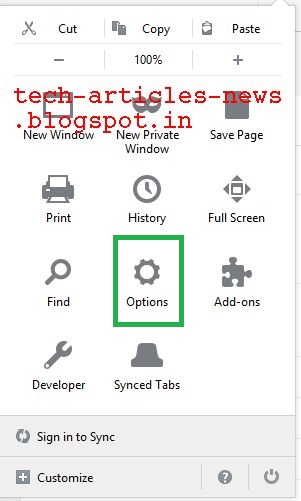
Click Menu -> Options
Click Privacy & Security
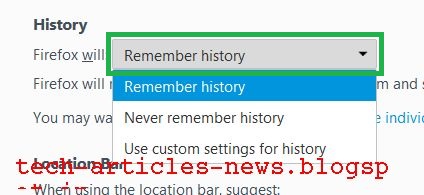
Under section History, Click Firefox will drop down list box
Select Never remember history
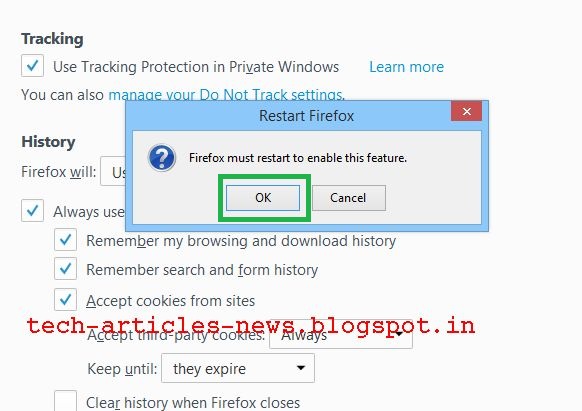
Prompt will popup asking to restart Mozilla Firefox Browser
Select Restart Firefox now
Now Mozilla Firefox Browser will start in normal mode with the settings of private browsing mode.
Click Privacy & Security
Under section History, Click Firefox will drop down list box
Select Never remember history
Prompt will popup asking to restart Mozilla Firefox Browser
Select Restart Firefox now
Now Mozilla Firefox Browser will start in normal mode with the settings of private browsing mode.
Restart hanged Mobile Phone with Non-Removable Battery
Press and hold Volume Down and Power buttons together for few seconds
Phone will restart
Phone will restart
Labels:
battery,
hang,
mobile,
mobile phone,
non removable battery,
phone,
restart,
screen lock,
smartphone
Change WhatsApp Account Phone Number
Wednesday, January 24, 2018
Please follow these steps to change account phone number in WhatsApp
Make sure new phone number can receive SMS or calls
Open WhatsApp
Press Menu Button
Make sure new phone number can receive SMS or calls
Open WhatsApp
Press Menu Button
Press Settings
Press Account
Press Change number
Press NEXT
Enter old and new phone number along with country code and Press DONE
Enter verification code received by SMS/call
You will get confirmation message, Press OK
Start Mozilla Firefox Browser in Private Mode by default
Wednesday, December 13, 2017
Open Firefox
Type about:config in address bar
Press Enter
Type browser.privatebrowsing.autostart in Search:
Right click browser.privatebrowsing.autostart and click Toggle (value will change to True)
Restart Firefox to apply settings
Alternate method
Click Menu

Click Options
Click Privacy

Click Drop Down Box next to Firefox will:
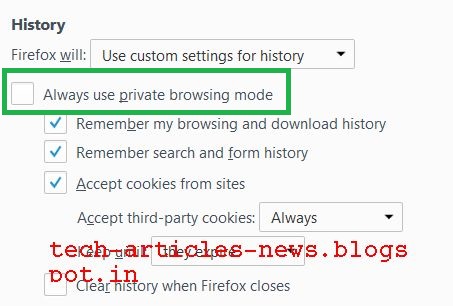
Choose Use custom settings for history
Select checkbox Always use private browsing mode
Click OK to restart FirefoxType about:config in address bar
Press Enter
Type browser.privatebrowsing.autostart in Search:
Right click browser.privatebrowsing.autostart and click Toggle (value will change to True)
Restart Firefox to apply settings
Alternate method
Click Menu

Click Options
Click Privacy

Click Drop Down Box next to Firefox will:
Choose Use custom settings for history
Select checkbox Always use private browsing mode

True Balance - Free Rs 5 recharge
Get free recharge of Rs.5!
Install the App and use Referal Code: 2P2UUFEF during signup
App Link : https://play.google.com/store/apps/details?id=com.balancehero.truebalance&hl=en
Install the App and use Referal Code: 2P2UUFEF during signup
App Link : https://play.google.com/store/apps/details?id=com.balancehero.truebalance&hl=en
Shutdown Android-x86
Monday, August 21, 2017
Follow the steps to shutdown Android-x86
Press Alt + F1 to open console
Type reboot -p
Press Alt + F1 to open console
Type reboot -p
Show Battery Percentage in Menu Bar
Friday, August 18, 2017
Labels:
android,
battery,
battery percentage,
menu bar,
mobile,
moto e3 power,
percentage,
smartphone
Lenovo Ideapad Notebook
Friday, August 04, 2017
Labels:
computer,
computers,
ideapad,
laptop,
lenovo,
lenovo ideapad,
lenovo ideapad notebook,
notebook,
windows
Xiaomi Redmi Note 4 Flipkart Flash Sale
Xiaomi Redmi Note 4 Flipkart Flash Sale on 12.00 PM, 4th August 2017
Create directory list from command prompt on Windows
Navigate to folder and run following command
dir > FileName.txt
or
dir >Complete Folder Path/Filename.txt
dir >> Filename.txt will append data to existing file
dir /s > FileName.txt will include sub-directories
dir /b > Filename.txt will save in Bare format
For more options run dir /?
dir > FileName.txt
or
dir >
dir /s > FileName.txt will include sub-directories
dir /b > Filename.txt will save in Bare format
For more options run dir /?
Labels:
cmd,
command,
command prompt,
dir,
directory,
directory list,
file,
file list,
folder,
folder list,
windows
Subscribe to:
Posts (Atom)