Powered by Blogger.

Social Icons

Featured Posts

Add Bookmarks in Brave Browser for Android

Friday, December 16, 2022

 Open Website in Brave app

Click Bookmark icon in bottom left.


Bookmark will get saved.


Clear Google Chrome Console History

Thursday, November 03, 2022

 Open Console

Right click in console and click Clear console history


Fix Horizontal Lines on Youtube videos

Saturday, October 15, 2022

 Go to  Chrome settings

Search for hardware acceleration

Turn off  the setting

Relaunch the browser


Delete Brave browser Internet history on Android

Wednesday, October 12, 2022

Open Brave Browser

Press three dots on lower-right corner


Press History


Press Clear browsing data...


Press Clear data


Check Bluetooth Headphones Battery Level

Sunday, June 26, 2022

Pair Bluetooth Headphone with mobile phone.

Now battery level will be visible.


Get X,Y coordinates of mouse cursor in Linux

Install package xdotool

sudo apt-get install xdotool


Now run following command to get X,Y coordinates of mouse cursor

xdotool getmouselocation


Output will be like this

x:1285 y:10 screen:0

Check if computer is BIOS or UEFI in Linux

Sunday, May 15, 2022

Look for  folder /sys/firmware/efi

ls /sys/firmware/efi

If folder is there then its UEFI otherwise its BIOS

Add Google Search engine to Firefox Browser in Linux Mint

Thursday, September 16, 2021

 Open following link in Firefox Browser

https://www.linuxmint.com/searchengines/anse.php?sen=Google&c=y


Right click in  Address Bar and select Add Google


Go to Preferences and select Google from Default Search Engine


Reset Windows Time Service from Command Prompt

Open Command Prompt as administrator

Run the following commands:

 net stop w32time

w32tm /unregister

w32tm /register

net start w32time

w32tm /resync /nowait

Sync time from Command Prompt in Windows

Open Command Prompt as administrator

Run the following command:

 w32tm /resync

WhatsApp Web Shortcuts Tips & Tricks

Sunday, January 10, 2021

Create new chat/group  Ctrl + Alt + N

Open WhatsApp profile Ctrl + Alt + P 

Open WhatsApp Settings Ctrl + Alt + ,

Search chats/messages Ctrl + Alt + /

Search inside active chat Ctrl + Alt + F

Archive active chat Ctrl + Alt + E 

Mute active chat Ctrl + Alt + Shift + M

Contact support Ctrl + Alt + Shift  + H

Mark active chat as unread Ctrl + Alt + Shift + U

Delete active chat Ctrl + Alt + Backspace

Bold text enclose text with asterisk *Hello* 

Italicize text  enclose text with underscore _Hello_

Strikethrough text enclose text with tilde ~Hello~

Change font enclose text with three backtick ```Hello```


Use WhatsApp on Computer | Connect to WhatsApp Web

 Please follow the steps to use WhatsApp on computer

Open https://web.whatsapp.com/ in browser

 You will see QR Code

Select the checkbox "Keep me signed in"


Now Open WhatsApp app on mobile phone

Make sure you are already registered on WhatsApp

Tap Menu


Tap WhatsApp Web 


Scan QR code on computer 


You will see chat(s) in browser 


Mobile phone needs to be connected to internet to use WhatsApp Web on computer.

Get permalink of Facebook post | Facebook post permalink

 To get the URL of Facebook post

Click the time stamp (Date, time) of the post


New page will open 

Note the URL from browser address bar


Free Image to text conversion | Free OCR

Wednesday, May 27, 2020

Open drive.google.com in browser

Locate the file and right click

Click Open with -> Google Docs


Open Mozilla Firefox automatically in Private Mode

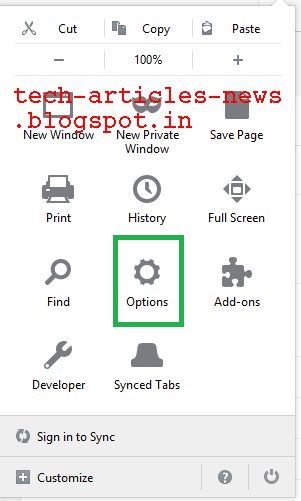
Click Menu -> Options


Click Privacy & Security
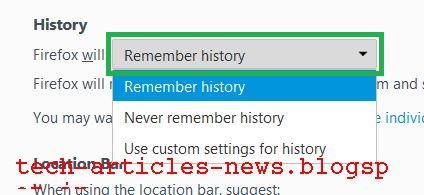
Under section History, Click Firefox will drop down list box
Select Never remember history


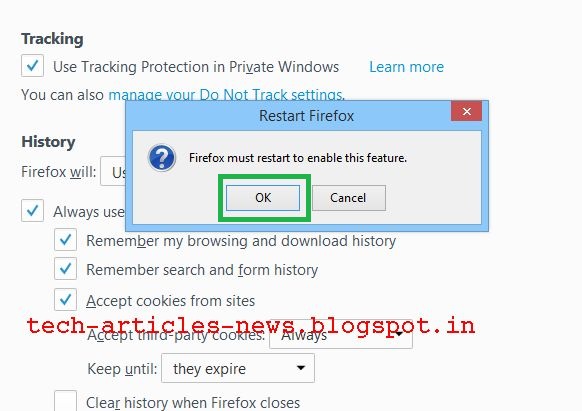
Prompt will popup asking to restart Mozilla Firefox Browser
Select Restart Firefox now


Now Mozilla Firefox Browser will start in normal mode with the settings of private browsing mode.

Redmi 8A Launch

Wednesday, September 25, 2019

Firefox Corrupted Content Error

Monday, April 01, 2019

Press Shift + Ctrl + R to reload the page

Restart hanged Mobile Phone with Non-Removable Battery

Press and hold Volume Down and Power buttons together for few seconds
Phone will restart

Change WhatsApp Account Phone Number

Wednesday, January 24, 2018

Please follow these steps to change account phone number in WhatsApp
Make sure new phone number can receive SMS or calls

Open WhatsApp
Press Menu Button
Press Settings

Press Account

Press Change number

Press NEXT

Enter old and new phone number along with country code and Press DONE 

Enter verification code received by SMS/call

You will get confirmation message, Press OK


Start Mozilla Firefox Browser in Private Mode by default

Wednesday, December 13, 2017

Open Firefox
Type about:config in address bar
Press Enter
Type browser.privatebrowsing.autostart in Search:

Right click browser.privatebrowsing.autostart and click Toggle (value will change to True)
Restart Firefox to apply settings

Alternate method

Click Menu


Click Options
 
Click Privacy

Click Drop Down Box next to Firefox will: 
 

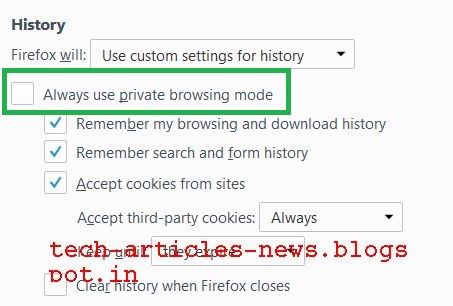
Choose Use custom settings for history
 

Select checkbox Always use private browsing mode
 
Click OK to restart Firefox
 

Translate

Popular Posts