
RoboForm
Saturday, February 23, 2008
RoboForm is a very popular password manager & form filler program.
Wubi: Windows Ubuntu Installer
Friday, February 01, 2008
Wubi is an unofficial Ubuntu installer for Windows. It gets installed as an application and can be uninstalled from Control Panel - Add or Remove Programs. A linux newbie can safely try linux other than Live CD without worrying about partition woes.
Screenshots
The program will download the Ubuntu alternate distro. But if you already have the Ubuntu alternate iso or cd which can be used to create an iso then you can use it and save the time of downloading. Simply put the iso in the C:\Wubi\Install Folder. You can check the version needed from Install Folder.
The program will skip the downloading part & check the checksum. Enjoy!
You can create iso from cd with PowerISO or any other software of your choice.
P.S. Try at your risk! Backup is always handy.
Configure ADSL in Slackware
Saturday, January 26, 2008
Run the command pppoe-setup in terminal
Enter the details as prompted.
Run the following command to start the connection
pppoe-start
Stop the connection with the command
pppoe-stop
Check the status of the connection with the command pppoe-status
Enter the details as prompted.
Run the following command to start the connection
pppoe-start
Stop the connection with the command
pppoe-stop
Check the status of the connection with the command pppoe-status
DriverMax - Backup / Restore Windows Drivers
Wednesday, January 16, 2008
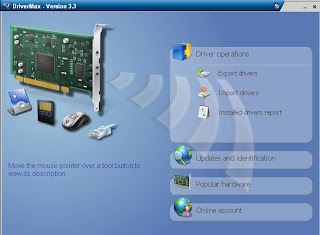
DriverMax allows you to backup and reinstall all your Windows drivers. It can also search for latest drivers available.


Global Shortcut Key to your Program
Friday, January 11, 2008
Create a shortcut to your program
Right click shortcut - Properties
Click Shortcut Tab
Click Text Box "Shortcut Key"
Press key of your choice
Click OK
Now you can run the program with the shortcut key combination
Right click shortcut - Properties
Click Shortcut Tab
Click Text Box "Shortcut Key"
Press key of your choice
Click OK
Now you can run the program with the shortcut key combination
Task Manager Keyboard Shortcut
Saturday, December 29, 2007
ALT + CTRL + DEL will open task manager directly if your system is configured to display Login Welcome Screen
Other shortcut :
ALT + CTRL + ESC
Other shortcut :
ALT + CTRL + ESC
Pidgin
Wednesday, December 19, 2007
Pidgin is an Instant Messaging client which supports many IM networks such as AIM, IRC, MSN, Yahoo, Google Talk and others.
Download Link
Trillian & Miranda are also good multi platform instant messenger clients.
Download Link
Trillian & Miranda are also good multi platform instant messenger clients.
Remote Control Winamp
Tuesday, November 27, 2007
BrowseAmp plugin allows Winamp to be controlled over LAN or other network. It provides web interface with lots of features.
Download Link : http://www.thasler.org/winamp2/BrowseAmp2.exe
You can start/stop server from Winamp - Preferences - Plug-ins - General Purpose - BrowseAmp - Configure

Download Link : http://www.thasler.org/winamp2/BrowseAmp2.exe
You can start/stop server from Winamp - Preferences - Plug-ins - General Purpose - BrowseAmp - Configure

Take Screenshot of Active Window
Saturday, November 24, 2007
Press Alt + Print Screen Key
Click Start - Accessories - Paint
Paint Window will open. Click Edit - Paste
Image will be pasted, Now Click File - Save As
Enter the File Name & File Type, Click Save
To take screenshot of the entire screen, press Print Screen key and follow the steps as above.
Click Start - Accessories - Paint
Paint Window will open. Click Edit - Paste
Image will be pasted, Now Click File - Save As
Enter the File Name & File Type, Click Save
To take screenshot of the entire screen, press Print Screen key and follow the steps as above.
Yahoo Block Checker
Monday, October 01, 2007
Yahoo Block Checker allows you to check if someone has blocked you. You can check the status whether your contact is online or offline.
MSN/ICQ/AIM/Trillian status checker is also available.
MSN/ICQ/AIM/Trillian status checker is also available.
Disable User Account Control
Thursday, August 23, 2007
You can disable User Account Control (UAC) in Windows Vista with msconfig.
Click Start - Run, Type msconfig
Click OK
Click "Tools" tab
Scroll down & you will see "Disable UAC"
Click on that line & Press the Launch button
A CMD(Command) window will open. When the command is done, you can close the window.
Close MSCONFIG.
You need to restart the computer for changes to take effect.
Click Start - Run, Type msconfig
Click OK
Click "Tools" tab
Scroll down & you will see "Disable UAC"
Click on that line & Press the Launch button
A CMD(Command) window will open. When the command is done, you can close the window.
Close MSCONFIG.
You need to restart the computer for changes to take effect.
Remove Linux Boot Loader from MBR
Sunday, August 19, 2007
Boot the system with Windows 9x disk.
run the command
fdisk /mbr
You can also remove it with xp cd.
Boot the system with Windows XP cd & go to recovery console
run the command
fixmbr
You can get boot disks from bootdisk.com.
run the command
fdisk /mbr
You can also remove it with xp cd.
Boot the system with Windows XP cd & go to recovery console
run the command
fixmbr
You can get boot disks from bootdisk.com.
Make ISO Image
Monday, August 13, 2007
dd if=/dev/hdx of=filename.iso
The iso file will be created in current directory.
Replace hdx with the device you want to make iso image whether its hard disk, cd/dvd rom or any other disk.
use hdxx for making iso image of a partition.
run fdisk -l if you want to know the partition number.
Make ISO image of a directory
mkisofs -o /tmp/filename.iso /tmp/directory/
The iso file will be created in /tmp directory.
You can also create an ISO image of mulfiple files.
Simply put the files in a directory & run the above command.
The iso file will be created in current directory.
Replace hdx with the device you want to make iso image whether its hard disk, cd/dvd rom or any other disk.
use hdxx for making iso image of a partition.
run fdisk -l if you want to know the partition number.
Make ISO image of a directory
mkisofs -o /tmp/filename.iso /tmp/directory/
The iso file will be created in /tmp directory.
You can also create an ISO image of mulfiple files.
Simply put the files in a directory & run the above command.
Read/Write ext2 Partition
Ext2 Installable File System software gives you read write access to ext2 partition from windows (NT/2K/XP/2K3). It is available for free of cost.
Please refer FAQ for accessing ext3 partitions.
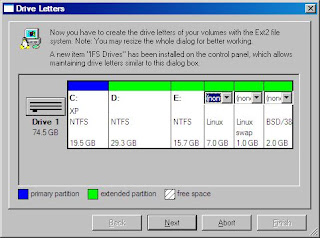
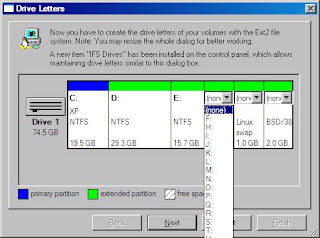
Configuration is very simple. Simply run the setup file and select the settings as prompted. At the end of setup, you have to specify the drive letter for ext2 partition(s). Once the setup is finished, you will find ext2 partition like any other drive in windows explorer.
Please see the following screenshots.
Disclaimer: Please use at your risk!
Please refer FAQ for accessing ext3 partitions.
Configuration is very simple. Simply run the setup file and select the settings as prompted. At the end of setup, you have to specify the drive letter for ext2 partition(s). Once the setup is finished, you will find ext2 partition like any other drive in windows explorer.
Please see the following screenshots.


Disclaimer: Please use at your risk!
Slackware Package Management
Saturday, August 11, 2007
Following commands are available in slackware to work with packages.
Install
installpkg packagename.tgz
Remove
removepkg packagename.tgz
Upgrade
upgradepkg packagename.tgz
makepkg (Creates a new Slackware compatible package.)
explodepkg packagename.tgz
(Extracts the contents of a Slackware compatible package to the current directory.)
rpm2targz packaganame.rpm
(Converts an RPM package to standard GNU tar + zip format [tar.gz])
rpm2tgz packaganame.rpm
(Converts an RPM (RedHat Package Manager) to a Slackware-compatible package [tgz])
pkgtool
package maintenance tool
Install
installpkg packagename.tgz
Remove
removepkg packagename.tgz
Upgrade
upgradepkg packagename.tgz
makepkg (Creates a new Slackware compatible package.)
explodepkg packagename.tgz
(Extracts the contents of a Slackware compatible package to the current directory.)
rpm2targz packaganame.rpm
(Converts an RPM package to standard GNU tar + zip format [tar.gz])
rpm2tgz packaganame.rpm
(Converts an RPM (RedHat Package Manager) to a Slackware-compatible package [tgz])
pkgtool
package maintenance tool
Batch Image Resize
Friday, August 10, 2007
You can resize images in batch with
IrfanView.
Click File - Batch Conversion\Rename
Locate the image(s) folder & Add the images
Click "Set advanced options" button
Specify the size & Click OK
Sepcify other option such as Output directory, Output format
Once you have configured the settings, click Start
Enjoy!!!
IrfanView.
Click File - Batch Conversion\Rename
Locate the image(s) folder & Add the images
Click "Set advanced options" button
Specify the size & Click OK
Sepcify other option such as Output directory, Output format
Once you have configured the settings, click Start
Enjoy!!!
Read / Write NTFS partition from Linux
Wednesday, August 01, 2007
NTFS-3G driver will allow to read / write to NTFS partitions.
Download source code from http://www.ntfs-3g.org/.
unpack the source package and 'cd' to the directory.
now run these commands.
./configure
make
make install
Use the following statement to mount ntfs partition.
mount -t ntfs-3g /dev/hdxx /mount-point
To know the partition (/dev/hdxx), run the command
fdisk -l
Download source code from http://www.ntfs-3g.org/.
unpack the source package and 'cd' to the directory.
now run these commands.
./configure
make
make install
Use the following statement to mount ntfs partition.
mount -t ntfs-3g /dev/hdxx /mount-point
To know the partition (/dev/hdxx), run the command
fdisk -l
CPU Information
Wednesday, July 18, 2007
CPU-Z is a free utlitiy which gives information of CPU and other system devices.
WCPUID/XCPUID is another program which displays information of cpu, memory etc.
WCPUID/XCPUID is another program which displays information of cpu, memory etc.
Subscribe to:
Posts (Atom)


